How Eden AI Assistant Works

Noah Parker
25 May, 2026
Eden AI is an AI-powered support assistant inside EasyDesk that helps businesses automate customer conversations, reduce support workload, and guide users toward faster resolutions.
The system combines AI chat, knowledge base search, ticket escalation, and live agent handoff into one support experience. Customers can ask questions directly inside the widget, receive instant answers from the knowledge base, and connect with a human agent when AI cannot resolve the issue.
What Eden AI Does
Eden AI helps support teams:
Answer repetitive customer questions automatically
Search and deliver knowledge base articles instantly
Collect visitor information before conversations start
Route unresolved conversations to human agents
Create support tickets that require further assistance
Reduce response time and agent workload
Keep support available 24/7
The AI assistant works directly inside the EasyDesk messenger widget.
How Eden AI Conversation Flow Works
Eden AI follows a structured support flow to guide customers from question to resolution.
Step 1: Visitor Opens The Chat Widget
A customer opens the EasyDesk chat widget from the website.
The AI assistant greets the visitor automatically and asks for basic information before starting the conversation.
You need to enter:
Name
Email address

The collected information helps support teams identify users and continue conversations later if needed.
This process helps:
Personalize conversations
Identify returning users
Improve ticket tracking
Maintain conversation history
Step 2: Eden AI Starts The Conversation
After form submission, Eden AI greets the customer personally.
The assistant encourages users to describe their problem or ask a question naturally.

Customers can type:
Product questions
Technical issues
Billing concerns
Password reset requests
Feature-related questions
Setup instructions
The chat input box remains active throughout the conversation for continuous messaging.
Step 3: Eden AI Searches The Knowledge Base
When a customer sends a message, Eden AI analyzes the request and searches the connected EasyDesk knowledge base.

The AI looks for:
Matching articles
Relevant documentation
Existing troubleshooting guides
FAQ answers
Product instructions
If the AI finds a relevant answer, it responds instantly inside the chat.
This allows customers to solve common problems without waiting for human support.
How Knowledge Base Matching Works
Eden AI uses the uploaded knowledge base content to understand customer intent.
The AI can:
Understand natural language questions
Match similar phrases and keywords
Detect user intent
Retrieve related articles automatically
Provide contextual responses
For example, a customer may ask:
“How do I reset my password?”
If your support portal has this problem-related knowledge base article or FAQ, Eden AI will show that answer to the customer.
Step 4: Eden AI Provides Resolution Options
Sometimes the AI cannot find an exact answer.
In that case, Eden AI offers fallback support options directly inside the conversation.
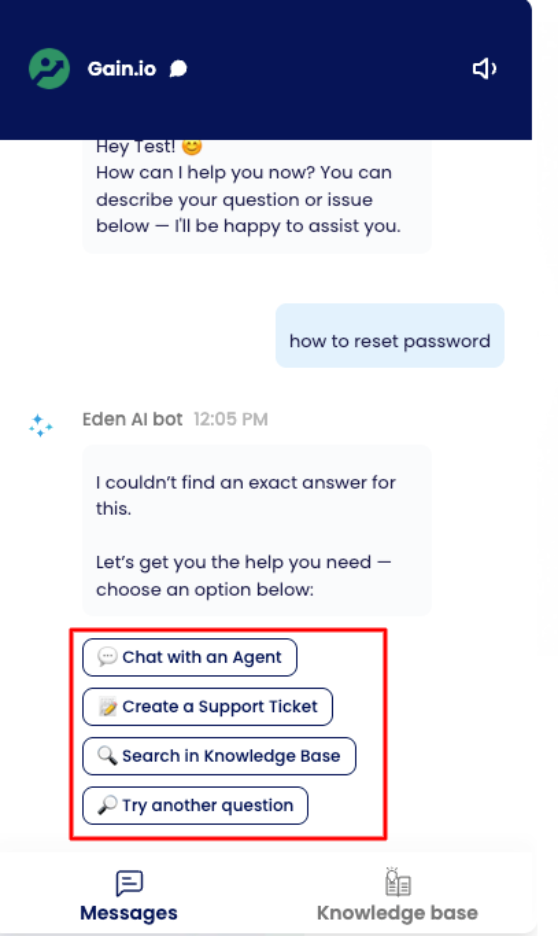
Options include:
Chat with an Agent
Create a Support Ticket
Search in Knowledge Base
Try Another Question
This fallback flow prevents dead-end conversations and ensures customers always have a next step.
Chat With An Agent
When a customer selects “Chat with an Agent,” the conversation moves from AI support to human support. A customer can talk with the agent based on 2 things:
Live chat is enabled in the channel
Business Hours and holidays are set in the channel settings
The system asks the customer to type their message.

The support team then receives:
Customer details
Previous AI conversation history
User messages
Escalation request
This helps agents continue the conversation without asking repetitive questions.
Note: If your brand has multiple channel and the live chat is enabled for those channel as well, you will need to select the channel to continue talking with an Agent.
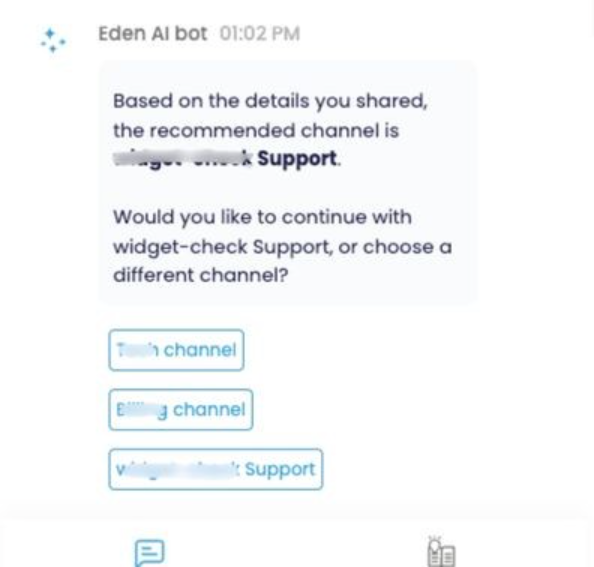
After the customer selects the channel, an agent will join the conversation.
Create A Support Ticket
Customers can also create a support ticket directly from the AI conversation.
This option is useful when:
The issue requires investigation
A technical team must review the problem
The customer needs follow-up later
Human assistance is unavailable immediately

The ticket stores:
Customer information
Chat history
Reported issue details (Subject, Description and Attachment)
Conversation timestamps
After creating the ticket Eden AI assistant shows the confirmation of the ticket creation.

Support teams can manage tickets later from the EasyDesk dashboard.
Search In Knowledge Base
The “Search in Knowledge Base” option allows customers to continue self-service support.

Instead of waiting for an agent, users can:
Browse help articles
Search documentation
Read troubleshooting steps
Access setup guides
This improves customer independence and reduces support volume.
Try Another Question
Customers can rephrase or submit another question if the AI does not understand the original request.
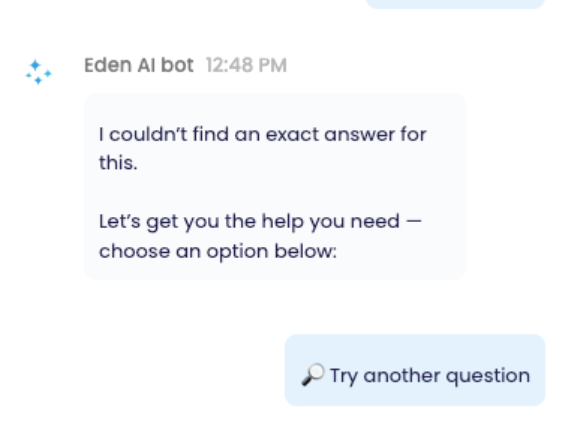
This option helps:
Clarify user intent
Improve answer accuracy
Continue automated support
Avoid unnecessary escalations
How Eden AI Helps Support Teams
Eden AI reduces repetitive work for customer support teams.
Instead of answering the same questions repeatedly, agents can focus on:
Complex customer issues
Priority tickets
Technical troubleshooting
Personalized support
The AI handles repetitive requests automatically.
Benefits for support teams include:
Faster first response time
Reduced ticket volume
Better support availability
Lower support workload
Improved customer satisfaction
How Eden AI Improves Customer Experience
Customers receive immediate support instead of waiting for manual responses.
Major customer benefits include:
Instant answers
24/7 availability
Faster issue resolution
Self-service support access
Easy escalation to human agents
Smooth conversation flow
The combination of AI automation and human handoff creates a more reliable support experience.
Common Use Cases For Eden AI
Businesses use Eden AI for:
SaaS customer support
Technical troubleshooting
Product onboarding
Billing support
Password recovery guidance
Help center automation
Internal employee support
E-commerce customer assistance
When Eden AI Escalates To Human Support
Eden AI transfers conversations to human agents when:
No relevant answer exists
The customer requests an agent
The issue becomes too complex
Sensitive account support is required
Technical troubleshooting needs manual review
This balance between automation and human support improves efficiency without reducing support quality.
Final Thoughts
Eden AI combines AI automation, knowledge base search, live chat, and ticket management into one support workflow.
Customers receive faster help through automated responses, while support teams reduce repetitive manual work.
The system creates a seamless support experience by guiding users from AI self-service to human assistance whenever necessary.
Businesses that maintain a strong knowledge base can use Eden AI to improve response speed, customer satisfaction, and overall support efficiency.
Was this information helpful?