Related Articles
No related articles found!
SLA Policy Settings In EasyDesk

Ava Adaline
22 February, 2026
This guide explains how to configure SLA Policy Settings in EasyDesk to define clear response and resolution targets for customer conversations based on ticket priority.
What Is an SLA Policy
An SLA (Service Level Agreement) policy defines the maximum time your support team commits to responding to and resolve tickets. SLA policies help teams meet customer expectations, improve accountability, and maintain consistent service quality across priorities.
How To Access SLA Policy Settings
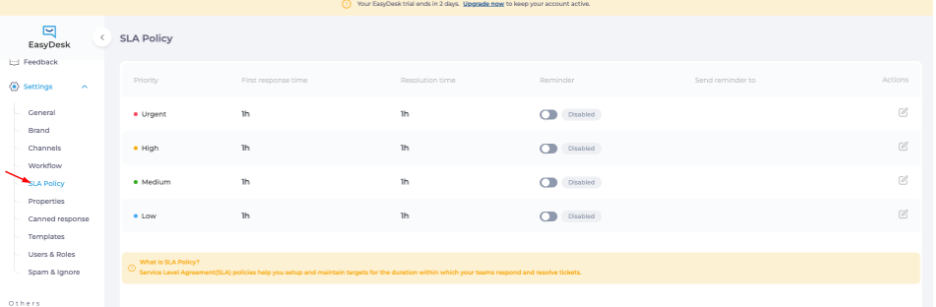
Open EasyDesk Dashboard
Go to Settings
Select SLA Policy
The SLA Policy page displays predefined priorities with response and resolution targets.
SLA Policy Overview
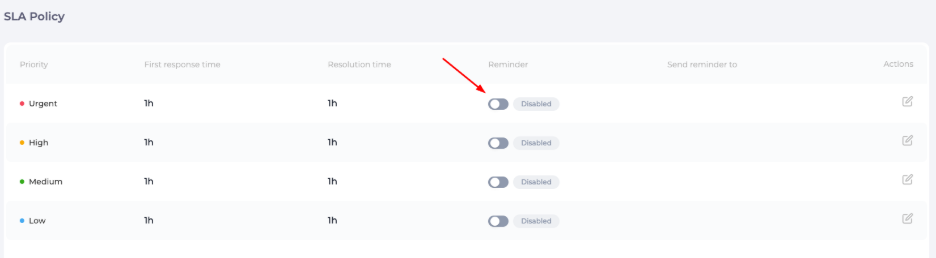
Each SLA policy row includes:
Priority – Urgent, High, Medium, or Low
First Response Time – Time limit for the first agent reply
Resolution Time – Time limit to fully resolve the ticket
Reminder – Toggle to send SLA breach reminders
Actions – Edit SLA values for each priority
These policies apply automatically based on the ticket priority.
SLA Priorities Explained

Urgent Priority
Used for critical issues requiring immediate attention. Typically assigned the shortest response and resolution time.
High Priority
For important issues that impact users but do not block operations completely.
Medium Priority
Standard support requests with balanced response expectations.
Low Priority
Non-critical issues such as general inquiries or minor requests.
Edit An SLA Policy

Click the Edit icon next to a priority
Update the following fields:
First Response Time (number + time unit)
Resolution Time (number + time unit)
Enable or disable Reminder
Click Save

Changes apply instantly to new and ongoing conversations under that priority.
SLA Reminder Settings
The Reminder toggle controls automated alerts when SLA targets approach or exceed limits.

Enabled: Sends reminders to assigned agents or teams
Disabled: No SLA breach notifications sent
This feature helps prevent missed deadlines and escalations.
SLA Best Practices
Assign realistic response times based on team capacity
Use shorter SLAs for high-impact priorities
Enable reminders for Urgent and High priorities
Review SLA performance regularly to adjust targets
SLA Policy Settings in EasyDesk provide structured time-based commitments for customer support. Proper configuration ensures faster responses, predictable resolutions, and higher customer trust across all support channels.
Was this information helpful?